Take uniform administration off your team.
Build program rules once, let employees self-serve, and give RPS the operational work behind the store.
Explore employer programs →MyCrudeStore connects your workforce to the products, allowances, rules, locations, approvals, and support built specifically for your company—backed by RPS Manufacturing Solutions.
MyCrudeStore is designed to make life easier for both the people managing a workforce program and the people actually wearing the gear.
Build program rules once, let employees self-serve, and give RPS the operational work behind the store.
Explore employer programs →Use your company store to see approved products, available allowance, shipping options, and order information.
Employee help →Locations, groups, approvals, catalogs, payment methods, shipping rules, and reporting can be structured around your program.
See program capabilities →RPS combines workforce ecommerce with manufacturing, distribution, product expertise, decoration, program administration, and customer service.
Private, mobile-friendly stores with company-specific products, eligibility, allowances, payment methods, and ordering rules.
RPS supports roster-driven eligibility, employee groups, approved locations, replenishment rules, account maintenance, and day-to-day program changes.
Reflective striping, patches, embroidery, logos, names, and other program-specific decoration coordinated with your approved products.
Ship to homes, offices, yards, rigs, or approved company locations so field employees receive gear where they need it.
Employees and program administrators have an RPS team for account questions, sizing, product help, exchanges, and order issues.
RPS combines manufacturing and distribution with program forecasting to help reduce excess inventory and support changing workforce demand.

RPS can structure a store so employees see the products, branding, payment methods, addresses, and allowances that fit their company program instead of sorting through an open consumer catalog.
Programs can combine RPS-developed products with broader approved workwear, PPE, footwear, accessories, and corporate gear.
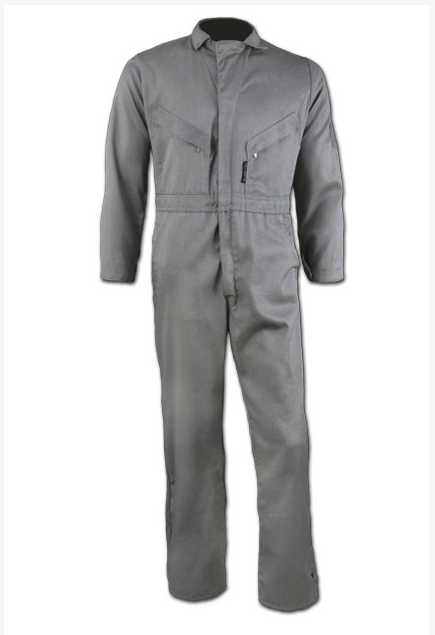
Coveralls, work shirts, pants, bibs, denim, outerwear, rainwear, insulated garments, and lightweight GridLock FR options.

Impact and non-impact work gloves engineered for industrial environments, including FlexShock impact protection.
Program-specific boots, gloves, accessories, and PPE can be integrated alongside uniforms in the employee store.

Branded apparel, promotional products, recognition programs, and company merchandise managed through RPS.
RPS is not simply a software provider. The platform is connected to the team sourcing, manufacturing, decorating, shipping, supporting, and improving the products your workforce depends on.
Talk with RPS about uniforms, PPE, allowances, fulfillment, decoration, approvals, or a custom employee ordering program.